> ## Documentation Index
> Fetch the complete documentation index at: https://dev.moonpay.com/llms.txt
> Use this file to discover all available pages before exploring further.
# Auth
> Authenticate a customer with a single OTP and return a fully-scoped access token.
The auth frame is the lowest-friction way to obtain a fully-scoped [access token](/platform/guides/api-and-sdk-credentials#access-token). The customer verifies an email or SMS one-time passcode and, on success, the frame returns encrypted authenticated credentials that your client can use to call the MoonPay API on the customer's behalf — for example to submit KYC information, fetch transactions, or perform other account-level operations.
## How it works
The auth frame should only be launched after the [check frame](/platform/frames/check) returns `connectionRequired`. The customer's email address and optionally phone number (passed when you [create a session](/platform/guides/connect-a-customer#create-a-session)) is how MoonPay identifies the user and where the one-time passcode is delivered:
* If MoonPay has a phone number on file for that user, the customer can choose to receive the code via SMS instead. If not, email is the only option.
* The customer does not need to be a returning MoonPay user. If no MoonPay account exists for the email yet, one is created during the OTP step. You can then drive any required onboarding or verification through other frames or directly via the API with the returned access token.
### Handling email mismatches
Make sure the email you pass when creating the session matches the customer's MoonPay account. If you send the wrong email — for example, a fresh address for a customer who already has an account under a different email — the auth flow will provision a brand-new account against the address you provided.
The customer can later reverify with the correct email, but the duplicate account will be flagged. If a duplicate is detected, the customer will later be asked to resolve it through a challenge flow during verification.
Use the full [connect frame](/platform/frames/connect) instead when you want MoonPay to orchestrate onboarding (KYC, address, document collection) inside the same flow.
## URL
```html theme={null}
https://platform.moonpay.com/v2/auth
```
## Requirements
### Key exchange
Credentials returned from the frame are encrypted to protect their content since they are sent over `postMessage`. You need to generate an [X25519](https://datatracker.ietf.org/doc/html/rfc7748#section-5) keypair and pass the public key into the frame. The frame uses your public key to encrypt the payload, ensuring only you can read it with your private key.
Never persist the private key to disk or storage. Hold it in memory only for
the duration of the session.
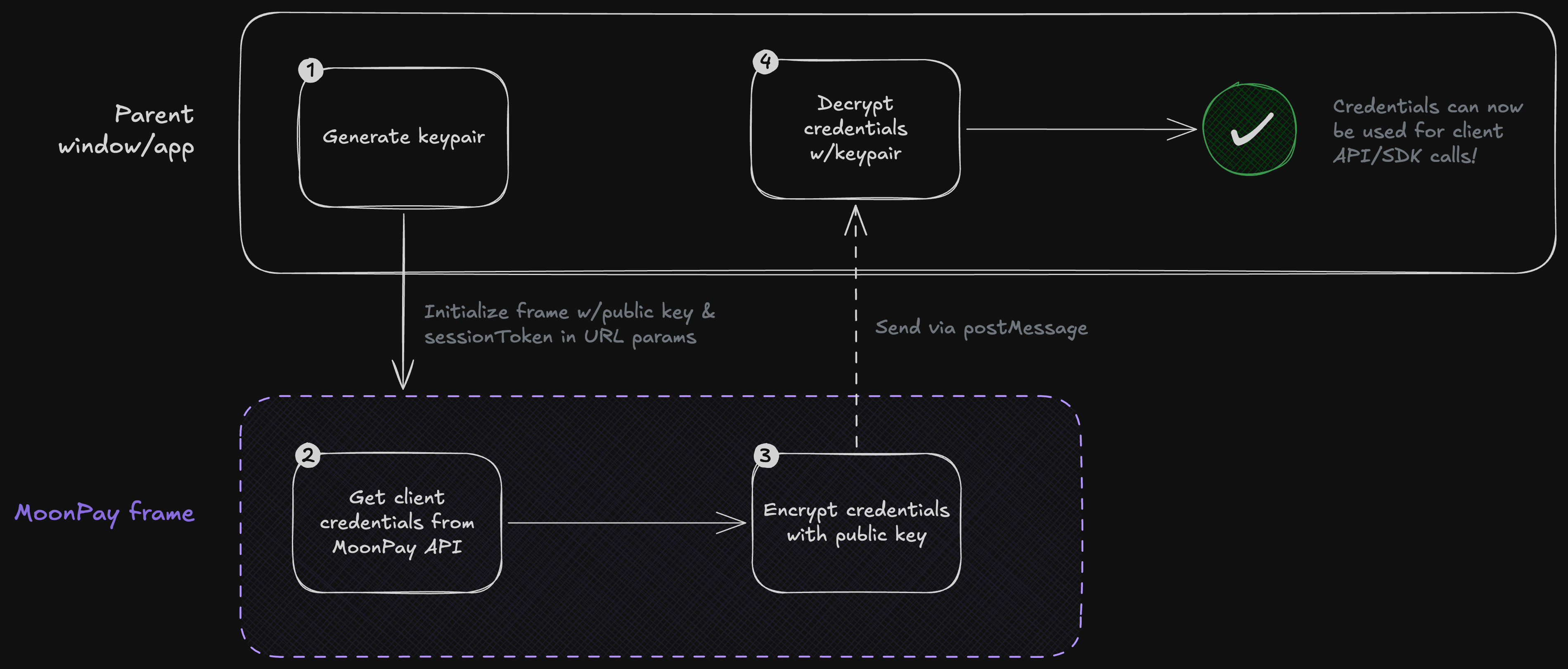
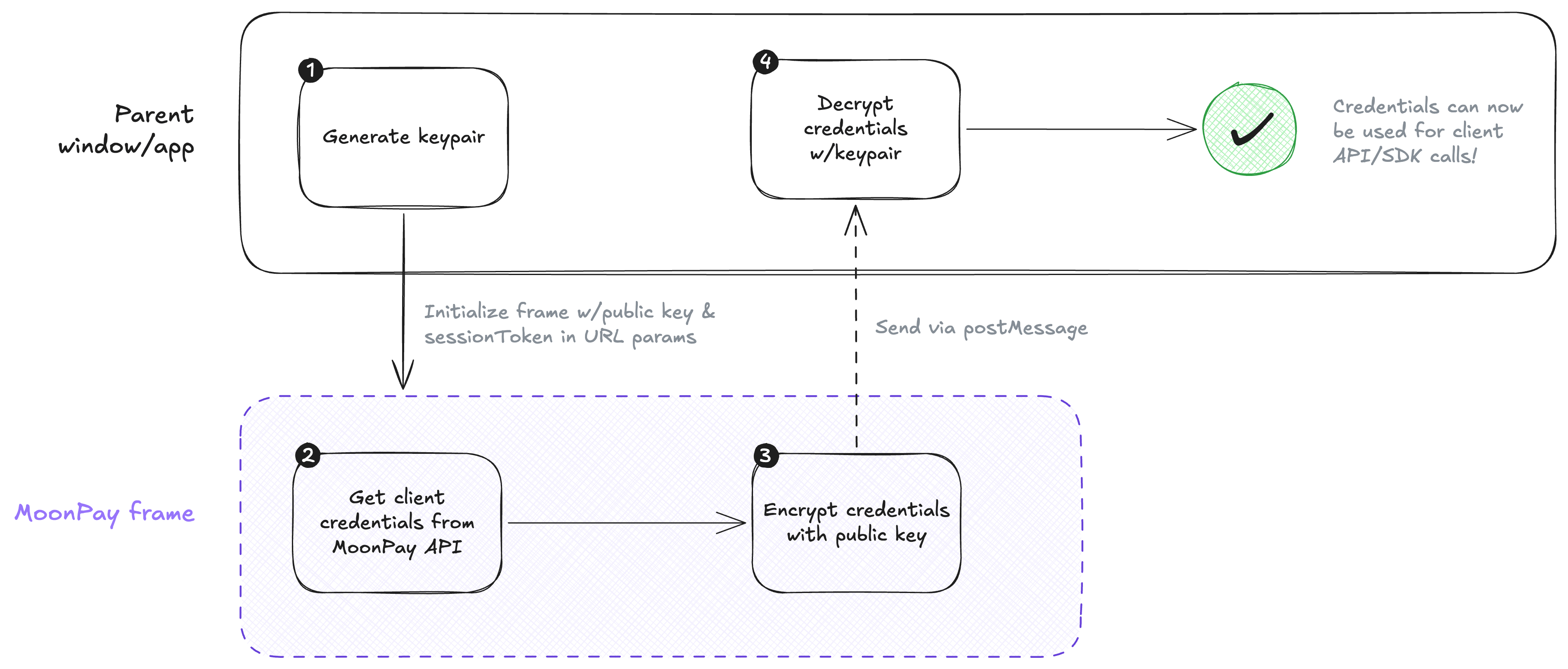 The frame uses the [@noble/curves](https://github.com/paulmillr/noble-curves) library internally. On web and React Native, you can use this same library to generate your keypair and handle decryption. For native platforms, use a compatible utility like [CryptoKit](https://developer.apple.com/documentation/cryptokit/curve25519) on iOS or [KeyPairGenerator](https://developer.android.com/reference/java/security/KeyPairGenerator) on Android.
The following example shows how to generate a keypair and decrypt credentials using `@noble/curves`. You'll want to add your own error handling and input validation for production use.
```sh pnpm theme={null}
pnpm i @noble/curves @noble/hashes @noble/ciphers
```
```sh bun theme={null}
bun add @noble/curves @noble/hashes @noble/ciphers
```
```sh npm theme={null}
npm i @noble/curves @noble/hashes @noble/ciphers
```
```ts crypto.ts theme={null}
// An example module for generating keypairs and decrypting client credentials.
// This should not be used as-is in production!
import { gcm } from "@noble/ciphers/aes.js";
import { x25519 } from "@noble/curves/ed25519.js";
import { hkdf } from "@noble/hashes/hkdf.js";
import { sha256 } from "@noble/hashes/sha2.js";
/** The credentials returned from the connect flow. */
export type ClientCredentials = {
/** A JWT used to authenticate client requests to the Moonpay API. */
accessToken: string;
/** A JWT used to initialize authenticated frames such as Apple Pay. */
clientToken: string;
/** An [ISO 8601 timestamp](https://developer.mozilla.org/en-US/docs/Web/JavaScript/Reference/Global_Objects/Date/toISOString) representing the expiration time of the tokens. */
expiresAt: string;
};
/** X25519 `privateKey` and `publicKey`as hex strings. */
export type KeyPair = Record<"privateKey" | "publicKey", string>;
export type DecryptClientCredentialsResult =
| { ok: true; value: ClientCredentials }
| { ok: false; error: string };
const hexToBytes = (hex: string): Uint8Array => {
if (hex.length % 2 !== 0) {
throw new Error("Invalid hex string");
}
const bytes = new Uint8Array(hex.length / 2);
for (let i = 0; i < bytes.length; i++) {
bytes[i] = parseInt(hex.substr(i * 2, 2), 16);
}
return bytes;
};
const bytesToHex = (bytes: Uint8Array): string => {
return Array.from(bytes)
.map((b) => b.toString(16).padStart(2, "0"))
.join("");
};
/** Decrypts an encrypted `ClientCredentials`. */
export const decryptClientCredentials = (
/** A base64-encoded string representing the encrypted JSON payload. **/
encryptedCredentials: string,
/** The recipient's X25519 private key as a hex string. **/
privateKeyHex: string,
): DecryptClientCredentialsResult => {
// Base64 decode the encrypted credentials
const payload = atob(encryptedCredentials);
// Guard and validate this deserialization
const parsedPayload = JSON.parse(payload);
// Convert the private key from a hex string to a `Uint8Array`
const privateKey = hexToBytes(privateKeyHex);
// Convert the ephemeral public key from a hex string to a `Uint8Array`
const publicKey = hexToBytes(parsedPayload.ephemeralPublicKey);
const ivBytes = hexToBytes(parsedPayload.iv);
const ciphertextBytes = hexToBytes(parsedPayload.ciphertext);
const sharedSecret = x25519.getSharedSecret(privateKey, publicKey);
const encryptionKey = hkdf(sha256, sharedSecret, undefined, undefined, 32);
const cipher = gcm(encryptionKey, ivBytes);
const plainTextBytes = cipher.decrypt(ciphertextBytes);
const plaintext = new TextDecoder().decode(plainTextBytes);
let parsed: unknown;
try {
parsed = JSON.parse(plaintext);
} catch {
return { ok: false, error: "Failed to parse decrypted payload as JSON" };
}
// Validate the decrypted payload
if (
typeof parsed !== "object" ||
parsed === null ||
typeof (parsed as Record).accessToken !== "string" ||
typeof (parsed as Record).clientToken !== "string" ||
typeof (parsed as Record).expiresAt !== "string"
) {
return { ok: false, error: "Decrypted payload missing required fields" };
}
return { ok: true, value: parsed as ClientCredentials };
};
/** Generates a new X25519 key pair encryption. */
export const generateKeyPair = (): KeyPair => {
const { secretKey: privateKey, publicKey } = x25519.keygen();
return {
privateKey: bytesToHex(privateKey),
publicKey: bytesToHex(publicKey),
};
};
```
The following example shows how to generate a keypair and decrypt credentials using `@noble/curves`. You'll want to add your own error handling and input validation for production use.
In React Native, yuo will need a [polyfill for `getRandomValues`](https://github.com/LinusU/react-native-get-random-values) ([MDN](https://developer.mozilla.org/en-US/docs/Web/API/Crypto/getRandomValues)) which is only available in browsers.
```sh pnpm theme={null}
pnpm i react-native-get-random-values @noble/curves @noble/hashes @noble/ciphers
```
```sh bun theme={null}
bun add react-native-get-random-values @noble/curves @noble/hashes @noble/ciphers
```
```sh npm theme={null}
npm i react-native-get-random-values @noble/curves @noble/hashes @noble/ciphers
```
```ts crypto.ts theme={null}
// An example module for generating keypairs and decrypting client credentials.
// This should not be used as-is in production!
import { gcm } from "@noble/ciphers/aes.js";
import { x25519 } from "@noble/curves/ed25519.js";
import { hkdf } from "@noble/hashes/hkdf.js";
import { sha256 } from "@noble/hashes/sha2.js";
// React Native polyfill for getRandomValues
import "react-native-get-random-values";
/** The credentials returned from the connect flow. */
export type ClientCredentials = {
/** A JWT used to authenticate client requests to the Moonpay API. */
accessToken: string;
/** A JWT used to initialize authenticated frames such as Apple Pay. */
clientToken: string;
/** An [ISO 8601 timestamp](https://developer.mozilla.org/en-US/docs/Web/JavaScript/Reference/Global_Objects/Date/toISOString) representing the expiration time of the tokens. */
expiresAt: string;
};
/** X25519 `privateKey` and `publicKey`as hex strings. */
export type KeyPair = Record<"privateKey" | "publicKey", string>;
export type DecryptClientCredentialsResult =
| { ok: true; value: ClientCredentials }
| { ok: false; error: string };
const hexToBytes = (hex: string): Uint8Array => {
if (hex.length % 2 !== 0) {
throw new Error("Invalid hex string");
}
const bytes = new Uint8Array(hex.length / 2);
for (let i = 0; i < bytes.length; i++) {
bytes[i] = parseInt(hex.substr(i * 2, 2), 16);
}
return bytes;
};
const bytesToHex = (bytes: Uint8Array): string => {
return Array.from(bytes)
.map((b) => b.toString(16).padStart(2, "0"))
.join("");
};
/** Decrypts an encrypted `ClientCredentials`. */
export const decryptClientCredentials = (
/** A base64-encoded string representing the encrypted JSON payload. **/
encryptedCredentials: string,
/** The recipient's X25519 private key as a hex string. **/
privateKeyHex: string,
): DecryptClientCredentialsResult => {
// Base64 decode the encrypted credentials
const payload = atob(encryptedCredentials);
// Guard and validate this deserialization
const parsedPayload = JSON.parse(payload);
// Convert the private key from a hex string to a `Uint8Array`
const privateKey = hexToBytes(privateKeyHex);
// Convert the ephemeral public key from a hex string to a `Uint8Array`
const publicKey = hexToBytes(parsedPayload.ephemeralPublicKey);
const ivBytes = hexToBytes(parsedPayload.iv);
const ciphertextBytes = hexToBytes(parsedPayload.ciphertext);
const sharedSecret = x25519.getSharedSecret(privateKey, publicKey);
const encryptionKey = hkdf(sha256, sharedSecret, undefined, undefined, 32);
const cipher = gcm(encryptionKey, ivBytes);
const plainTextBytes = cipher.decrypt(ciphertextBytes);
const plaintext = new TextDecoder().decode(plainTextBytes);
let parsed: unknown;
try {
parsed = JSON.parse(plaintext);
} catch {
return { ok: false, error: "Failed to parse decrypted payload as JSON" };
}
// Validate the decrypted payload
if (
typeof parsed !== "object" ||
parsed === null ||
typeof (parsed as Record).accessToken !== "string" ||
typeof (parsed as Record).clientToken !== "string" ||
typeof (parsed as Record).expiresAt !== "string"
) {
return { ok: false, error: "Decrypted payload missing required fields" };
}
return { ok: true, value: parsed as ClientCredentials };
};
/** Generates a new X25519 key pair encryption. */
export const generateKeyPair = (): KeyPair => {
const { secretKey: privateKey, publicKey } = x25519.keygen();
return {
privateKey: bytesToHex(privateKey),
publicKey: bytesToHex(publicKey),
};
};
```
## Initialization parameters
| Property | Type | Required | Description |
| ------------- | --------- | -------- | ---------------------------------------------------------------------------------------------------------------------------------------------------------------------------------------------------------------------------------------------------------------- |
| `clientToken` | `string` | ✅ | The anonymous client token obtained after decrypting the `credentials` returned by the [check frame](/platform/frames/check) when the status is `connectionRequired`. |
| `publicKey` | `string` | ✅ | An ephemeral public key generated on the client. See [requirements](#requirements) for details.
The frame uses the [@noble/curves](https://github.com/paulmillr/noble-curves) library internally. On web and React Native, you can use this same library to generate your keypair and handle decryption. For native platforms, use a compatible utility like [CryptoKit](https://developer.apple.com/documentation/cryptokit/curve25519) on iOS or [KeyPairGenerator](https://developer.android.com/reference/java/security/KeyPairGenerator) on Android.
The following example shows how to generate a keypair and decrypt credentials using `@noble/curves`. You'll want to add your own error handling and input validation for production use.
```sh pnpm theme={null}
pnpm i @noble/curves @noble/hashes @noble/ciphers
```
```sh bun theme={null}
bun add @noble/curves @noble/hashes @noble/ciphers
```
```sh npm theme={null}
npm i @noble/curves @noble/hashes @noble/ciphers
```
```ts crypto.ts theme={null}
// An example module for generating keypairs and decrypting client credentials.
// This should not be used as-is in production!
import { gcm } from "@noble/ciphers/aes.js";
import { x25519 } from "@noble/curves/ed25519.js";
import { hkdf } from "@noble/hashes/hkdf.js";
import { sha256 } from "@noble/hashes/sha2.js";
/** The credentials returned from the connect flow. */
export type ClientCredentials = {
/** A JWT used to authenticate client requests to the Moonpay API. */
accessToken: string;
/** A JWT used to initialize authenticated frames such as Apple Pay. */
clientToken: string;
/** An [ISO 8601 timestamp](https://developer.mozilla.org/en-US/docs/Web/JavaScript/Reference/Global_Objects/Date/toISOString) representing the expiration time of the tokens. */
expiresAt: string;
};
/** X25519 `privateKey` and `publicKey`as hex strings. */
export type KeyPair = Record<"privateKey" | "publicKey", string>;
export type DecryptClientCredentialsResult =
| { ok: true; value: ClientCredentials }
| { ok: false; error: string };
const hexToBytes = (hex: string): Uint8Array => {
if (hex.length % 2 !== 0) {
throw new Error("Invalid hex string");
}
const bytes = new Uint8Array(hex.length / 2);
for (let i = 0; i < bytes.length; i++) {
bytes[i] = parseInt(hex.substr(i * 2, 2), 16);
}
return bytes;
};
const bytesToHex = (bytes: Uint8Array): string => {
return Array.from(bytes)
.map((b) => b.toString(16).padStart(2, "0"))
.join("");
};
/** Decrypts an encrypted `ClientCredentials`. */
export const decryptClientCredentials = (
/** A base64-encoded string representing the encrypted JSON payload. **/
encryptedCredentials: string,
/** The recipient's X25519 private key as a hex string. **/
privateKeyHex: string,
): DecryptClientCredentialsResult => {
// Base64 decode the encrypted credentials
const payload = atob(encryptedCredentials);
// Guard and validate this deserialization
const parsedPayload = JSON.parse(payload);
// Convert the private key from a hex string to a `Uint8Array`
const privateKey = hexToBytes(privateKeyHex);
// Convert the ephemeral public key from a hex string to a `Uint8Array`
const publicKey = hexToBytes(parsedPayload.ephemeralPublicKey);
const ivBytes = hexToBytes(parsedPayload.iv);
const ciphertextBytes = hexToBytes(parsedPayload.ciphertext);
const sharedSecret = x25519.getSharedSecret(privateKey, publicKey);
const encryptionKey = hkdf(sha256, sharedSecret, undefined, undefined, 32);
const cipher = gcm(encryptionKey, ivBytes);
const plainTextBytes = cipher.decrypt(ciphertextBytes);
const plaintext = new TextDecoder().decode(plainTextBytes);
let parsed: unknown;
try {
parsed = JSON.parse(plaintext);
} catch {
return { ok: false, error: "Failed to parse decrypted payload as JSON" };
}
// Validate the decrypted payload
if (
typeof parsed !== "object" ||
parsed === null ||
typeof (parsed as Record).accessToken !== "string" ||
typeof (parsed as Record).clientToken !== "string" ||
typeof (parsed as Record).expiresAt !== "string"
) {
return { ok: false, error: "Decrypted payload missing required fields" };
}
return { ok: true, value: parsed as ClientCredentials };
};
/** Generates a new X25519 key pair encryption. */
export const generateKeyPair = (): KeyPair => {
const { secretKey: privateKey, publicKey } = x25519.keygen();
return {
privateKey: bytesToHex(privateKey),
publicKey: bytesToHex(publicKey),
};
};
```
The following example shows how to generate a keypair and decrypt credentials using `@noble/curves`. You'll want to add your own error handling and input validation for production use.
In React Native, yuo will need a [polyfill for `getRandomValues`](https://github.com/LinusU/react-native-get-random-values) ([MDN](https://developer.mozilla.org/en-US/docs/Web/API/Crypto/getRandomValues)) which is only available in browsers.
```sh pnpm theme={null}
pnpm i react-native-get-random-values @noble/curves @noble/hashes @noble/ciphers
```
```sh bun theme={null}
bun add react-native-get-random-values @noble/curves @noble/hashes @noble/ciphers
```
```sh npm theme={null}
npm i react-native-get-random-values @noble/curves @noble/hashes @noble/ciphers
```
```ts crypto.ts theme={null}
// An example module for generating keypairs and decrypting client credentials.
// This should not be used as-is in production!
import { gcm } from "@noble/ciphers/aes.js";
import { x25519 } from "@noble/curves/ed25519.js";
import { hkdf } from "@noble/hashes/hkdf.js";
import { sha256 } from "@noble/hashes/sha2.js";
// React Native polyfill for getRandomValues
import "react-native-get-random-values";
/** The credentials returned from the connect flow. */
export type ClientCredentials = {
/** A JWT used to authenticate client requests to the Moonpay API. */
accessToken: string;
/** A JWT used to initialize authenticated frames such as Apple Pay. */
clientToken: string;
/** An [ISO 8601 timestamp](https://developer.mozilla.org/en-US/docs/Web/JavaScript/Reference/Global_Objects/Date/toISOString) representing the expiration time of the tokens. */
expiresAt: string;
};
/** X25519 `privateKey` and `publicKey`as hex strings. */
export type KeyPair = Record<"privateKey" | "publicKey", string>;
export type DecryptClientCredentialsResult =
| { ok: true; value: ClientCredentials }
| { ok: false; error: string };
const hexToBytes = (hex: string): Uint8Array => {
if (hex.length % 2 !== 0) {
throw new Error("Invalid hex string");
}
const bytes = new Uint8Array(hex.length / 2);
for (let i = 0; i < bytes.length; i++) {
bytes[i] = parseInt(hex.substr(i * 2, 2), 16);
}
return bytes;
};
const bytesToHex = (bytes: Uint8Array): string => {
return Array.from(bytes)
.map((b) => b.toString(16).padStart(2, "0"))
.join("");
};
/** Decrypts an encrypted `ClientCredentials`. */
export const decryptClientCredentials = (
/** A base64-encoded string representing the encrypted JSON payload. **/
encryptedCredentials: string,
/** The recipient's X25519 private key as a hex string. **/
privateKeyHex: string,
): DecryptClientCredentialsResult => {
// Base64 decode the encrypted credentials
const payload = atob(encryptedCredentials);
// Guard and validate this deserialization
const parsedPayload = JSON.parse(payload);
// Convert the private key from a hex string to a `Uint8Array`
const privateKey = hexToBytes(privateKeyHex);
// Convert the ephemeral public key from a hex string to a `Uint8Array`
const publicKey = hexToBytes(parsedPayload.ephemeralPublicKey);
const ivBytes = hexToBytes(parsedPayload.iv);
const ciphertextBytes = hexToBytes(parsedPayload.ciphertext);
const sharedSecret = x25519.getSharedSecret(privateKey, publicKey);
const encryptionKey = hkdf(sha256, sharedSecret, undefined, undefined, 32);
const cipher = gcm(encryptionKey, ivBytes);
const plainTextBytes = cipher.decrypt(ciphertextBytes);
const plaintext = new TextDecoder().decode(plainTextBytes);
let parsed: unknown;
try {
parsed = JSON.parse(plaintext);
} catch {
return { ok: false, error: "Failed to parse decrypted payload as JSON" };
}
// Validate the decrypted payload
if (
typeof parsed !== "object" ||
parsed === null ||
typeof (parsed as Record).accessToken !== "string" ||
typeof (parsed as Record).clientToken !== "string" ||
typeof (parsed as Record).expiresAt !== "string"
) {
return { ok: false, error: "Decrypted payload missing required fields" };
}
return { ok: true, value: parsed as ClientCredentials };
};
/** Generates a new X25519 key pair encryption. */
export const generateKeyPair = (): KeyPair => {
const { secretKey: privateKey, publicKey } = x25519.keygen();
return {
privateKey: bytesToHex(privateKey),
publicKey: bytesToHex(publicKey),
};
};
```
## Initialization parameters
| Property | Type | Required | Description |
| ------------- | --------- | -------- | ---------------------------------------------------------------------------------------------------------------------------------------------------------------------------------------------------------------------------------------------------------------- |
| `clientToken` | `string` | ✅ | The anonymous client token obtained after decrypting the `credentials` returned by the [check frame](/platform/frames/check) when the status is `connectionRequired`. |
| `publicKey` | `string` | ✅ | An ephemeral public key generated on the client. See [requirements](#requirements) for details.
The frame uses this key to encrypt the [client credentials](/platform/guides/api-and-sdk-credentials#client-credentials) returned from the auth flow. |
| `channelId` | `string` | ✅ | A unique identifier for the frame generated on your client. This value is attached to each `postMessage` payload to help identify messages.
The format of this string is up to you. |
| `partnerName` | `string` | | The partner name to display in the frame UI. Typically set by the SDK from the session token — only override this if you're integrating directly without the SDK. |
| `partnerLogo` | `string` | | The partner logo to display in the frame UI. Typically set by the SDK from the session token — only override this if you're integrating directly without the SDK. |
| `brandColor` | `string` | | A 6-digit hex color (with or without leading `#`) used as the partner brand color in the frame UI. Invalid values fall back to the MoonPay default. |
| `customTheme` | `string` | | A JSON-stringified theme-override object. Supports `borderRadius`, `colorScheme` (`auto`/`light`/`dark`), and `palette.semanticColors` (`positive`/`negative`/`caution` hex). Invalid or oversized values fall back to the MoonPay default. |
| `autoFocus` | `boolean` | | Whether the one-time passcode input is focused automatically when the frame loads. Defaults to `true`. Pass `false` if your app manages focus itself (for example, to avoid the mobile keyboard opening before the frame is visible). |
## Events
All events are dispatched using the message pattern described in the [frames protocol](/platform/frames/overview#frames-protocol#messages). Below are the event payloads specific to the auth frame.
### Outbound events
frame->parent
These events are sent from this frame to the parent window.
#### `handshake`
The frame requests that you open a message channel.
```json Example theme={null}
{
"version": 2,
"meta": { "channelId": "ch_1" },
"kind": "handshake"
}
```
```ts twoslash TypeScript definition theme={null}
type Message = T & {
version: 2;
meta: { channelId: string };
};
type HandshakeEvent = Message<{
kind: "handshake";
}>;
```
#### `ready`
The frame has loaded and dispatched the customer's first one-time passcode. Use this to reveal the frame and drop any loading state you were showing in its place.
```json Example theme={null}
{
"version": 2,
"meta": { "channelId": "ch_1" },
"kind": "ready"
}
```
```ts twoslash TypeScript definition theme={null}
type Message = T & {
version: 2;
meta: { channelId: string };
};
type ReadyEvent = Message<{
kind: "ready";
}>;
```
#### `complete`
The auth flow finished. The `payload` is a `Connection` object whose `status` field tells you the outcome:
* **`active`** — the customer is authenticated. The payload includes the customer's id and encrypted authenticated client credentials. Any outstanding KYC or onboarding requirement is surfaced through `capabilities`, not a separate status — use the returned access token to drive it.
* **`termsAcceptanceRequired`** — the customer must accept updated Terms of Use before the connection can be used. No credentials are attached: display the Terms of Use in your own UI, capture the acceptance timestamp, pass it as `termsAcceptedAt` when you create a new session (`POST /platform/v1/sessions`), then relaunch the flow. Passing `termsAcceptedAt` requires the Identity or Guest Checkout account capability.
* **`pending`** / **`unavailable`** — status-only completions with no credentials: the connection exists but isn't currently usable (a KYC decision is still pending, or the customer is in a restricted location).
```json Active theme={null}
{
"version": 2,
"meta": { "channelId": "ch_1" },
"kind": "complete",
"payload": {
"status": "active",
"credentials": "",
"customer": { "id": "" }
}
}
```
```json Terms acceptance required theme={null}
{
"version": 2,
"meta": { "channelId": "ch_1" },
"kind": "complete",
"payload": {
"status": "termsAcceptanceRequired"
}
}
```
```ts twoslash TypeScript definition expandable theme={null}
type Message = T & {
version: 2;
meta: { channelId: string };
};
enum ConnectionStatus {
/** The connection is valid and can be used. **/
active = "active",
/** The customer must accept updated Terms of Use before the connection can be used. **/
termsAcceptanceRequired = "termsAcceptanceRequired",
/** A KYC decision is still pending; the connection is not yet usable. **/
pending = "pending",
/** The connection cannot be used (for example, a restricted location). **/
unavailable = "unavailable",
}
type PaymentDisclosuresRequirement = {
/** The customer's ISO 3166-1 alpha-3 residential country code. E.g. `"USA"` or `"FRA"` */
country: string;
/** The state or province code, when disclosures apply to a subdivision. E.g. `"NY"` or `"WA"` */
administrativeArea?: string;
/** The broader regulatory area for the country, when applicable. Currently `"EEA"`. */
area?: string;
};
type CustomerCapabilities = {
ramps: {
requirements: {
/** Present when disclosure geography is available. Use `country`, `administrativeArea`, and `area` to determine which disclosure, if any, applies. **/
paymentDisclosures?: PaymentDisclosuresRequirement;
};
};
};
type ActiveConnection = {
status: ConnectionStatus.active;
/** The authenticated MoonPay customer. **/
customer: { id: string };
/** Encrypted client credentials containing the accessToken and clientToken. Once decrypted, the value contains a stringified JSON object with the following structure:
*
* {
* "accessToken": "",
* "clientToken": "",
* "expiresAt": "",
* }
*
* - `accessToken`: A fully-scoped token that can be used to make authenticated API requests on behalf of the customer.
* - `clientToken`: A token that can be used to initialize sensitive frames such as Apple Pay.
* - `expiresAt`: An ISO 8601 formatted string indicating when the tokens expire.
**/
credentials: string;
/** Regulatory capabilities for the authenticated customer. Present only when there is a requirement to surface; omitted otherwise. **/
capabilities?: CustomerCapabilities;
};
type TermsAcceptanceRequiredConnection = {
status: ConnectionStatus.termsAcceptanceRequired;
};
type PendingConnection = {
status: ConnectionStatus.pending;
};
type UnavailableConnection = {
status: ConnectionStatus.unavailable;
};
type AuthCompleteEvent = Message<{
kind: "complete";
payload:
| ActiveConnection
| TermsAcceptanceRequiredConnection
| PendingConnection
| UnavailableConnection;
}>;
```
#### `error`
This event dispatches errors that occur in the flow. The error message is developer-facing and not intended to be rendered in UI.
The frame emits this event for every [terminal error](#terminal-errors) so the parent always knows when the flow has failed and can tear down the iframe or surface a fallback in your app. Recoverable mistakes the customer can retry inside the frame (such as an invalid or expired code) are not reported through this event — see [Error handling](#error-handling) for the full breakdown.
Terminal errors that occur during the flow carry `code: "generic"`. Invalid initialization parameters — a missing or malformed `clientToken`, `publicKey`, or `channelId` — are instead reported with `code: "validationError"` and a list of the offending fields, before the OTP flow starts.
```json Generic theme={null}
{
"version": 2,
"meta": { "channelId": "ch_1" },
"kind": "error",
"payload": {
"code": "generic",
"message": "Authorization failed"
}
}
```
```json Validation error theme={null}
{
"version": 2,
"meta": { "channelId": "ch_1" },
"kind": "error",
"payload": {
"code": "validationError",
"errors": [
{ "code": "invalidClientToken", "message": "clientToken is required" }
]
}
}
```
```ts twoslash TypeScript definition theme={null}
type Message = T & {
version: 2;
meta: { channelId: string };
};
type ValidationFieldError = {
/** Which initialization parameter failed validation. */
code: "invalidClientToken" | "invalidPublicKey" | "invalidChannelId";
message: string;
};
type AuthFlowError = Message<{
kind: "error";
payload:
| {
/** A terminal failure during the flow. */
code: "generic";
/** A developer-facing error message with details on recovery or documentation. This message is not intended to be rendered in UI. */
message: string;
}
| {
/** One or more initialization parameters were missing or malformed; emitted before the flow starts. */
code: "validationError";
errors: ValidationFieldError[];
};
}>;
```
#### `close`
The customer dismissed the frame. The parent should tear down the iframe or WebView in response.
```json Example theme={null}
{
"version": 2,
"meta": { "channelId": "ch_1" },
"kind": "close"
}
```
```ts twoslash TypeScript definition theme={null}
type Message = T & {
version: 2;
meta: { channelId: string };
};
type CloseEvent = Message<{
kind: "close";
}>;
```
### Inbound events
parent->frame
These events are sent from the parent window to this frame.
#### `ack`
Acknowledge the [handshake](#handshake).
```json Example theme={null}
{
"version": 2,
"meta": { "channelId": "ch_1" },
"kind": "ack"
}
```
```ts twoslash TypeScript definition theme={null}
type Message = T & {
version: 2;
meta: { channelId: string };
};
type AckEvent = Message<{
kind: "ack";
}>;
```
## Error handling
The auth frame splits failures into two categories. Inline errors are handled silently inside the frame so the customer can retry without the parent doing anything. Terminal errors end the flow — the frame shows a full-screen error state to the customer **and** sends an [`error`](#error) post-message to the parent at the same time, so your app can react (for example, by tearing down the iframe or surfacing a fallback).
### Inline errors
These are recoverable mistakes the customer can fix without leaving the OTP screen. The frame shows an inline message under the code input and stays open so the customer can retry. The parent does not receive an `error` event for these.
| Scenario | Message shown to the customer |
| ---------------------------------------------- | ------------------------------------------------------------------------------------------------------------------------------------ |
| Wrong code entered | "That doesn't look right, try a new code" |
| Code has expired | "That code is old, try a new one" |
| Rate limit hit when **resending** a fresh code | "Too many requests. Try again later." (shown briefly as an auto-clearing hint; the customer can wait out the cooldown and try again) |
### Terminal errors
These end the flow. The frame replaces its content with a full-screen error state — depending on the cause, the customer is offered a **Retry** button, a **Close** button, or both. The parent always receives an [`error`](#error) event with `code: "generic"` for every terminal error, so it can dismiss the iframe or surface a fallback in your app.
| Scenario | Message shown to the customer |
| --------------------------------------------------------- | --------------------------------------------------- |
| Too many failed code attempts | "Too many failed attempts. Please try again later." |
| OTP session expired before the customer entered the code | "Verification session expired. Please start over." |
| Rate limit hit while **sending the initial OTP** (boot) | "Too many requests. Try again later." |
| Authorization failed when exchanging the verified OTP | "Authorization failed. Please try again." |
| Account cannot be used (for example, restricted location) | "This account is unavailable." |
| Any other unexpected failure | "Something went wrong. Please try again." |