> ## Documentation Index
> Fetch the complete documentation index at: https://dev.moonpay.com/llms.txt
> Use this file to discover all available pages before exploring further.
# Introduction
> Build fiat->crypto experiences with headless payments. You control the user experience while MoonPay handles compliance, risk, and fraud.
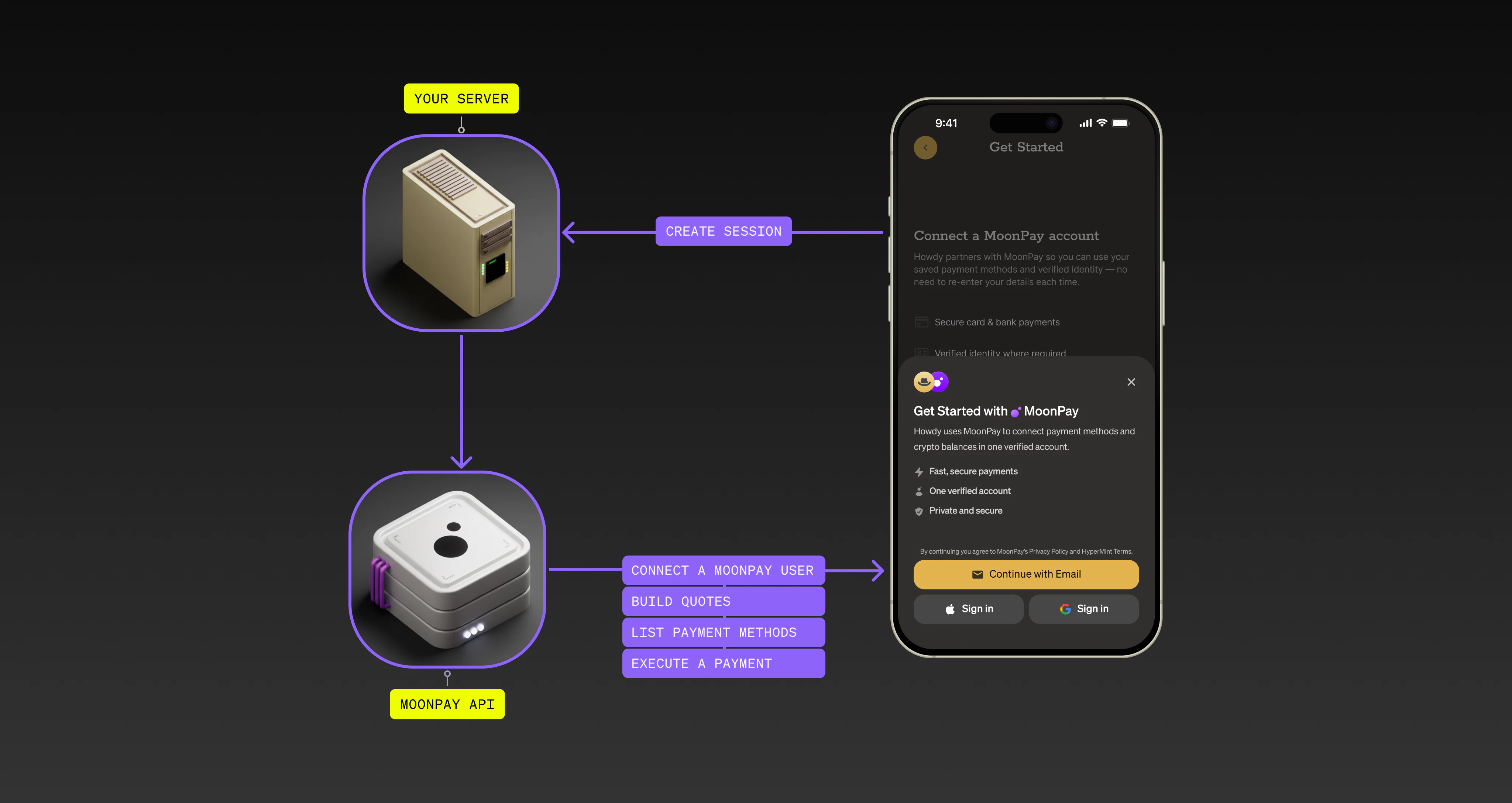
 ## Welcome to the MoonPay Platform
Use the MoonPay Platform APIs, SDKs, and frames to build crypto ramps directly in your app. Before you start, review the [requirements](/platform/overview/requirements) and [core concepts](/platform/overview/core-concepts).
## Getting started
Connect a customer’s MoonPay account so you can list payment methods, get
quotes, and execute transactions.
Set up a payment method (like Apple Pay) and execute a transaction in your
UI.
Embed headless and co-branded UI in your app.
Explore the Platform API endpoints and parameters.
## Quickstart
Get a session token}>
Create a [session token](/api-reference/platform/endpoints/sessions/create) on your server and send the token to your frontend.
```ts Create session token theme={null}
// Server-side code example
const url = "https://api.moonpay.com/platform/v1/sessions";
const res = await fetch(url, {
headers: {
"Content-Type": "application/json",
"X-Api-Key": "sk_test_123",
},
method: "POST",
body: JSON.stringify({
externalCustomerId: "your_user_id",
deviceIp: "...ip address from client",
}),
});
console.log(await res.json());
```
```json Result theme={null}
{
"sessionToken": "c3N0XzAwMQ=="
}
```
Connect a customer}>
On your frontend, check whether the customer has an active connection. If they do, you receive credentials for the next steps.
```ts Check the connection theme={null}
import { createClient } from "@moonpay/platform-sdk-web";
// Create the client with your session token
const client = createClient({
sessionToken: "c3N0XzAwMQ==", // The session token from your server
});
// Check if the customer has an active connection
const connectionResult = await client.getConnection();
if (!connectionResult.ok) {
// Handle error
}
console.log(connectionResult.value);
```
```ts Result (active) theme={null}
{
status: "active",
customer: {
id: "Y3VzX2FiYzEyMw=="
},
// Encrypted credentials — the SDK decrypts and stores them internally
credentials: "ZW5jXzAwMQ==",
capabilities: {}
}
```
```ts Result (requires connection) theme={null}
{
status: "connectionRequired",
// Encrypted credentials — the SDK decrypts and stores them internally
credentials: "ZW5jXzAwMQ=="
}
```
List payment methods}>
List the payment methods available to the customer at the current time.
```ts List payment methods theme={null}
// After connecting, list available payment methods
const paymentMethodsResult = await client.getPaymentMethods();
if (!paymentMethodsResult.ok) {
// Handle error
}
console.log(paymentMethodsResult.value);
// [{ type: "apple_pay", capabilities: {...}, availability: {...} }, ...]
```
Get quotes}>
Get [quotes](/platform/overview/core-concepts#executable-quotes) with detailed fees and limits for transactions.
```ts Get quotes theme={null}
const quoteResult = await client.getQuote({
source: { asset: { code: "USD" }, amount: "100.00" }, // The fiat currency and amount to pay
destination: { asset: { code: "ETH" } }, // The crypto the customer will receive
wallet: { address: "0x..." }, // The destination wallet address
paymentMethod: { type: "apple_pay" },
});
if (!quoteResult.ok) {
// Handle error
}
console.log(quoteResult.value);
// { signature: "...", expiresAt: "2026-01-12T14:45:00Z", ... }
```
Execute headless payments}>
Once you have a quote, [execute the transaction](/platform/guides/pay-with-apple-pay).
```ts Pay with Apple Pay theme={null}
import type { ApplePayEvent } from "@moonpay/platform-sdk-web";
const paymentButtonContainer = document.querySelector("#payment");
const setupApplePayResult = await client.setupApplePay({
quote: quoteResult.value.signature, // The quote signature
container: paymentButtonContainer,
onEvent: (event: ApplePayEvent) => {
switch (event.kind) {
case "ready":
// Reveal the button
paymentButtonContainer.style.opacity = "1";
break;
case "complete":
// The transaction is executing. Use polling and/or webhooks to track final status.
console.log(event.payload.transaction);
// { id: "txn_01", status: "pending" }
break;
case "quoteExpired":
// Fetch a new quote and update the frame
// event.payload.setQuote(newQuote.signature);
break;
}
},
});
if (!setupApplePayResult.ok) {
// Handle error
}
```
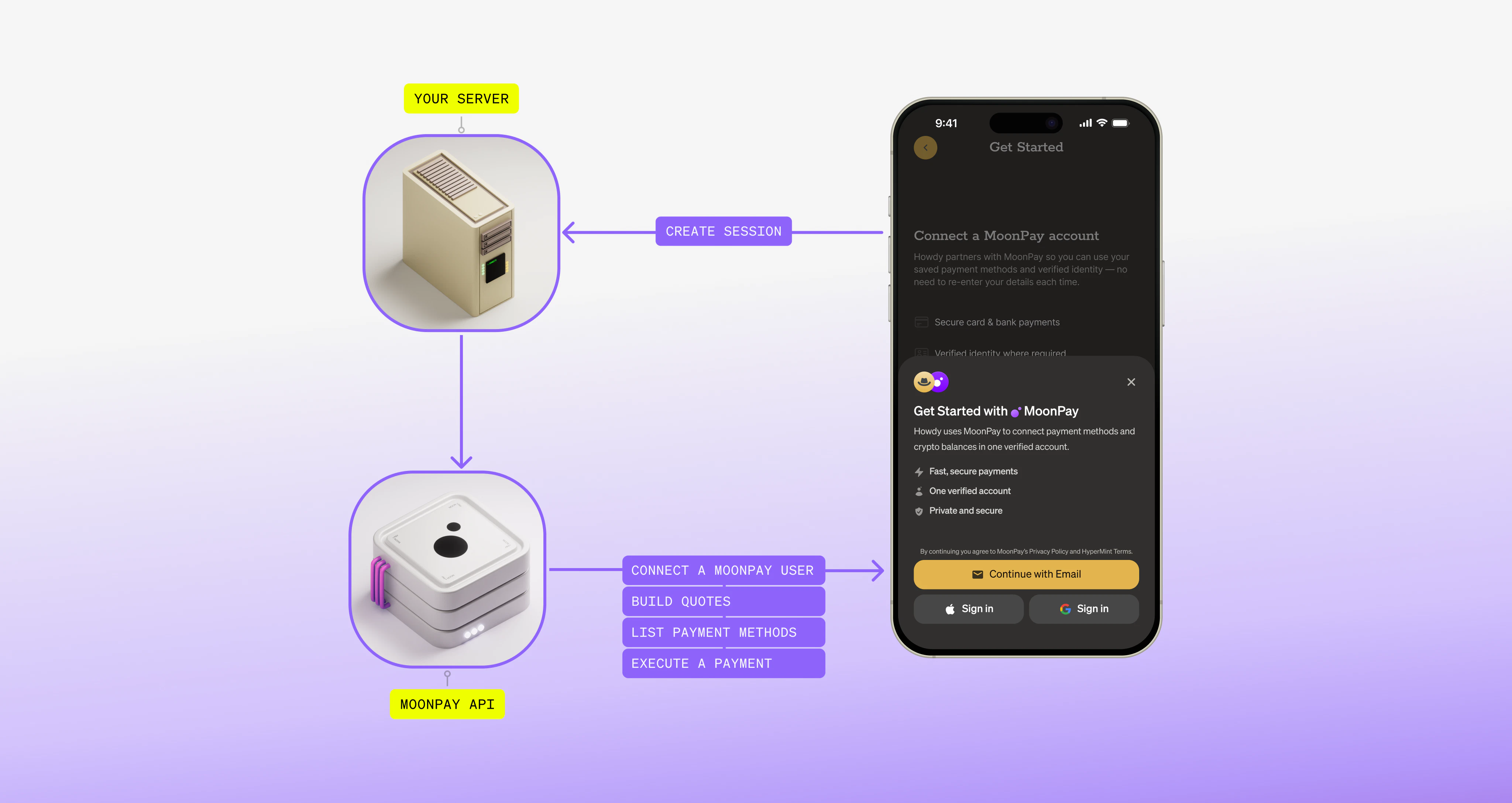
## Welcome to the MoonPay Platform
Use the MoonPay Platform APIs, SDKs, and frames to build crypto ramps directly in your app. Before you start, review the [requirements](/platform/overview/requirements) and [core concepts](/platform/overview/core-concepts).
## Getting started
Connect a customer’s MoonPay account so you can list payment methods, get
quotes, and execute transactions.
Set up a payment method (like Apple Pay) and execute a transaction in your
UI.
Embed headless and co-branded UI in your app.
Explore the Platform API endpoints and parameters.
## Quickstart
Get a session token}>
Create a [session token](/api-reference/platform/endpoints/sessions/create) on your server and send the token to your frontend.
```ts Create session token theme={null}
// Server-side code example
const url = "https://api.moonpay.com/platform/v1/sessions";
const res = await fetch(url, {
headers: {
"Content-Type": "application/json",
"X-Api-Key": "sk_test_123",
},
method: "POST",
body: JSON.stringify({
externalCustomerId: "your_user_id",
deviceIp: "...ip address from client",
}),
});
console.log(await res.json());
```
```json Result theme={null}
{
"sessionToken": "c3N0XzAwMQ=="
}
```
Connect a customer}>
On your frontend, check whether the customer has an active connection. If they do, you receive credentials for the next steps.
```ts Check the connection theme={null}
import { createClient } from "@moonpay/platform-sdk-web";
// Create the client with your session token
const client = createClient({
sessionToken: "c3N0XzAwMQ==", // The session token from your server
});
// Check if the customer has an active connection
const connectionResult = await client.getConnection();
if (!connectionResult.ok) {
// Handle error
}
console.log(connectionResult.value);
```
```ts Result (active) theme={null}
{
status: "active",
customer: {
id: "Y3VzX2FiYzEyMw=="
},
// Encrypted credentials — the SDK decrypts and stores them internally
credentials: "ZW5jXzAwMQ==",
capabilities: {}
}
```
```ts Result (requires connection) theme={null}
{
status: "connectionRequired",
// Encrypted credentials — the SDK decrypts and stores them internally
credentials: "ZW5jXzAwMQ=="
}
```
List payment methods}>
List the payment methods available to the customer at the current time.
```ts List payment methods theme={null}
// After connecting, list available payment methods
const paymentMethodsResult = await client.getPaymentMethods();
if (!paymentMethodsResult.ok) {
// Handle error
}
console.log(paymentMethodsResult.value);
// [{ type: "apple_pay", capabilities: {...}, availability: {...} }, ...]
```
Get quotes}>
Get [quotes](/platform/overview/core-concepts#executable-quotes) with detailed fees and limits for transactions.
```ts Get quotes theme={null}
const quoteResult = await client.getQuote({
source: { asset: { code: "USD" }, amount: "100.00" }, // The fiat currency and amount to pay
destination: { asset: { code: "ETH" } }, // The crypto the customer will receive
wallet: { address: "0x..." }, // The destination wallet address
paymentMethod: { type: "apple_pay" },
});
if (!quoteResult.ok) {
// Handle error
}
console.log(quoteResult.value);
// { signature: "...", expiresAt: "2026-01-12T14:45:00Z", ... }
```
Execute headless payments}>
Once you have a quote, [execute the transaction](/platform/guides/pay-with-apple-pay).
```ts Pay with Apple Pay theme={null}
import type { ApplePayEvent } from "@moonpay/platform-sdk-web";
const paymentButtonContainer = document.querySelector("#payment");
const setupApplePayResult = await client.setupApplePay({
quote: quoteResult.value.signature, // The quote signature
container: paymentButtonContainer,
onEvent: (event: ApplePayEvent) => {
switch (event.kind) {
case "ready":
// Reveal the button
paymentButtonContainer.style.opacity = "1";
break;
case "complete":
// The transaction is executing. Use polling and/or webhooks to track final status.
console.log(event.payload.transaction);
// { id: "txn_01", status: "pending" }
break;
case "quoteExpired":
// Fetch a new quote and update the frame
// event.payload.setQuote(newQuote.signature);
break;
}
},
});
if (!setupApplePayResult.ok) {
// Handle error
}
```