> ## Documentation Index
> Fetch the complete documentation index at: https://dev.moonpay.com/llms.txt
> Use this file to discover all available pages before exploring further.
# Conversion badges
> Convert users better by displaying MoonPay Badges within your dapp or marketplace.
## Product overview
MoonPay conversion badges generate your DApp, wallet, or marketplace additional affiliate fees by increasing click through rate and conversion for existing MoonPay customers. While conducting user research, it became clear that submitting an ID and completing a selfie is typically the highest friction part of a user's journey. MoonPay has 20M verified users, millions of which we’ve KYCed with an ID & selfie. MoonPay is also live in over 900 DApps, and if users onboard MoonPay through one of these channels, their details are saved while visiting another channel.
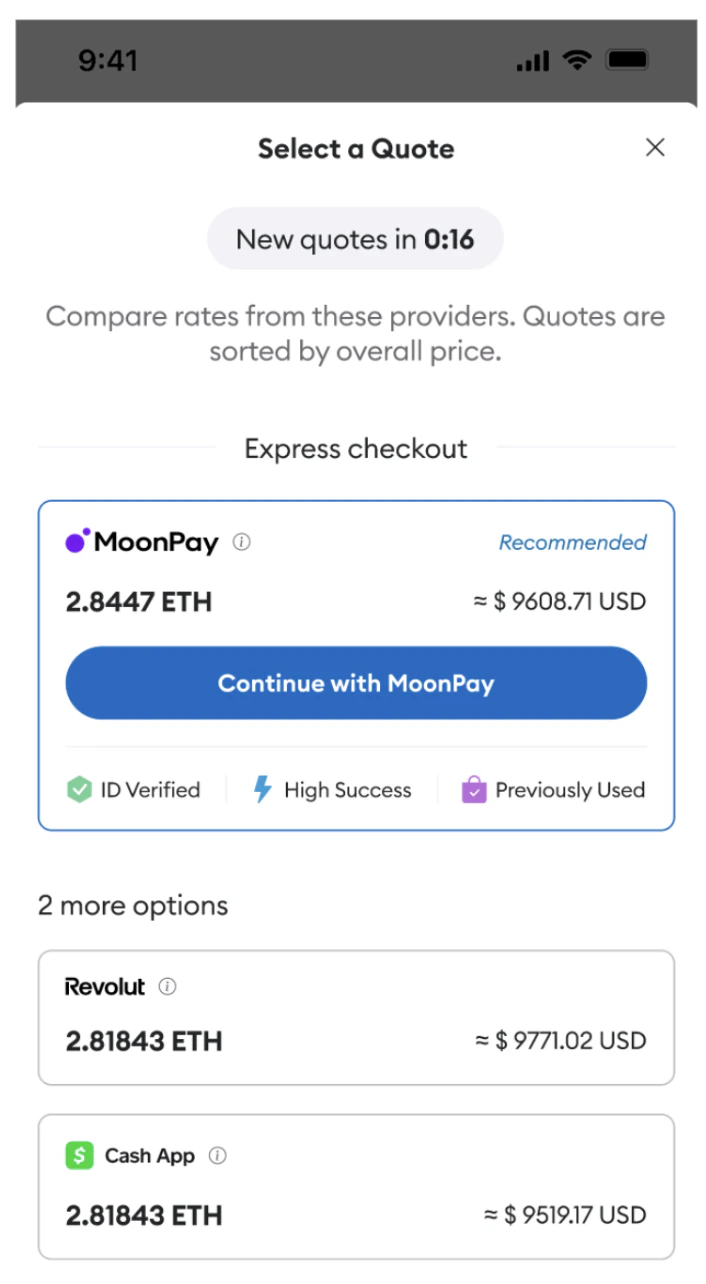
As an example, users who have completed KYC while on-ramping through MoonPay on OpenSea, will not need to complete an additional ID & Selfie while on-ramping through MoonPay on Uniswap. This feature allows you to understand the KYC status of a user using just their wallet address, and without them ever opening the MoonPay widget. As a result, you can display an `ID Verified` badge on your DApp, informing the user they are no longer required to complete this high friction process.
 ## Product benefits
* Conversion Badges is simple and lightning quick to integrate.
* Increase conversion for your users, generating you more affiliate fees.
* MoonPay has a large database of KYC'd users compared to other On Ramp providers, increasing conversion for a greater subset of your users.
## Quick integration guide
Get your production API keys and go-live with our existing on-ramp product.
Contact your account manager or reach out via the chat function in your
MoonPay Dashboard to request access to this feature.
As your users look for quotes on your marketplace, pass the users wallet address to the below endpoint, send `GET` request to `https://api.moonpay.com/v3/customers/badges?walletAddress=`
Optional parameter `externalCustomerId` (ID of the customer on the partner side). If we can’t find the customer by `walletAddress`, we’ll fallback to the `externalCustomerId`, giving us two ways to identify the customer.
Include the following authentication header Authorization: `Authorization: "Api-Key ${secretApiKey}"`
**Protect Your Secret Key**
Due to the sensitive nature of the data accessed through this endpoint, a secret API key is required. It is crucial that all requests using this key are made from a server-side environment. Exposing the secret key within client-side code can lead to security vulnerabilities and unauthorized access. Make sure the key remains confidential and is not embedded in any frontend code.
Receive the following response:
```json theme={null}
{
"availability": "Active",
"hasKyc": true
}
```
**Possible values for availability:**
* `Active`: Customer found (not blocked or deleted)
* `Inactive`: Customer is blocked or deleted
* `Unknown`: Customer not found
For hasKyc`true` responses, display a "ID Verified" badge next to MoonPay on your user interface.
## Product benefits
* Conversion Badges is simple and lightning quick to integrate.
* Increase conversion for your users, generating you more affiliate fees.
* MoonPay has a large database of KYC'd users compared to other On Ramp providers, increasing conversion for a greater subset of your users.
## Quick integration guide
Get your production API keys and go-live with our existing on-ramp product.
Contact your account manager or reach out via the chat function in your
MoonPay Dashboard to request access to this feature.
As your users look for quotes on your marketplace, pass the users wallet address to the below endpoint, send `GET` request to `https://api.moonpay.com/v3/customers/badges?walletAddress=`
Optional parameter `externalCustomerId` (ID of the customer on the partner side). If we can’t find the customer by `walletAddress`, we’ll fallback to the `externalCustomerId`, giving us two ways to identify the customer.
Include the following authentication header Authorization: `Authorization: "Api-Key ${secretApiKey}"`
**Protect Your Secret Key**
Due to the sensitive nature of the data accessed through this endpoint, a secret API key is required. It is crucial that all requests using this key are made from a server-side environment. Exposing the secret key within client-side code can lead to security vulnerabilities and unauthorized access. Make sure the key remains confidential and is not embedded in any frontend code.
Receive the following response:
```json theme={null}
{
"availability": "Active",
"hasKyc": true
}
```
**Possible values for availability:**
* `Active`: Customer found (not blocked or deleted)
* `Inactive`: Customer is blocked or deleted
* `Unknown`: Customer not found
For hasKyc`true` responses, display a "ID Verified" badge next to MoonPay on your user interface.