> ## Documentation Index
> Fetch the complete documentation index at: https://dev.moonpay.com/llms.txt
> Use this file to discover all available pages before exploring further.
# Architecture
> The MoonPay On-Ramp is a standalone widget product with an optional API and webhooks for an enhanced user experience. We provide web and mobile SDKs to render the widget in your app and a backend Node SDK for performing server-side functions.
## Components for on-ramp integrations
| Component | Features |
| -------------------------------------------------------------------- | --------------------------------------------------------------------------------------------------------------------------------------------------------------------------------------------------------------------------------------- |
| [URL integration](/widget/on-ramp/integration-methods/url) | An alternative to using our SDKs Generate MoonPay widget links to show the widget in an iframe or mobile webview |
| [Web SDKs](/widget/on-ramp/integration-methods/sdks/web) | [Parameters](/widget/on-ramp/customization/parameters) to pre-fill cryptocurrency, amount, user email, etc. Includes [communication layer](/widget/on-ramp/integration-methods/sdks/events) between partner apps and the MoonPay widget |
| [Mobile SDKs](/widget/on-ramp/integration-methods/sdks/react-native) | React Native SDK |
| [Node SDK](/widget/on-ramp/integration-methods/sdks/node) | Perform server-side functions, like [URL signing](/widget/on-ramp/customization/url-signing) |
| [MoonPay API](/api-reference/widget) | Get minimum / maximum purchase amounts Get buy quote Show transaction history |
| [Webhooks](/api-reference/widget/webhooks/overview) | Get transaction updates |
## High-level diagram
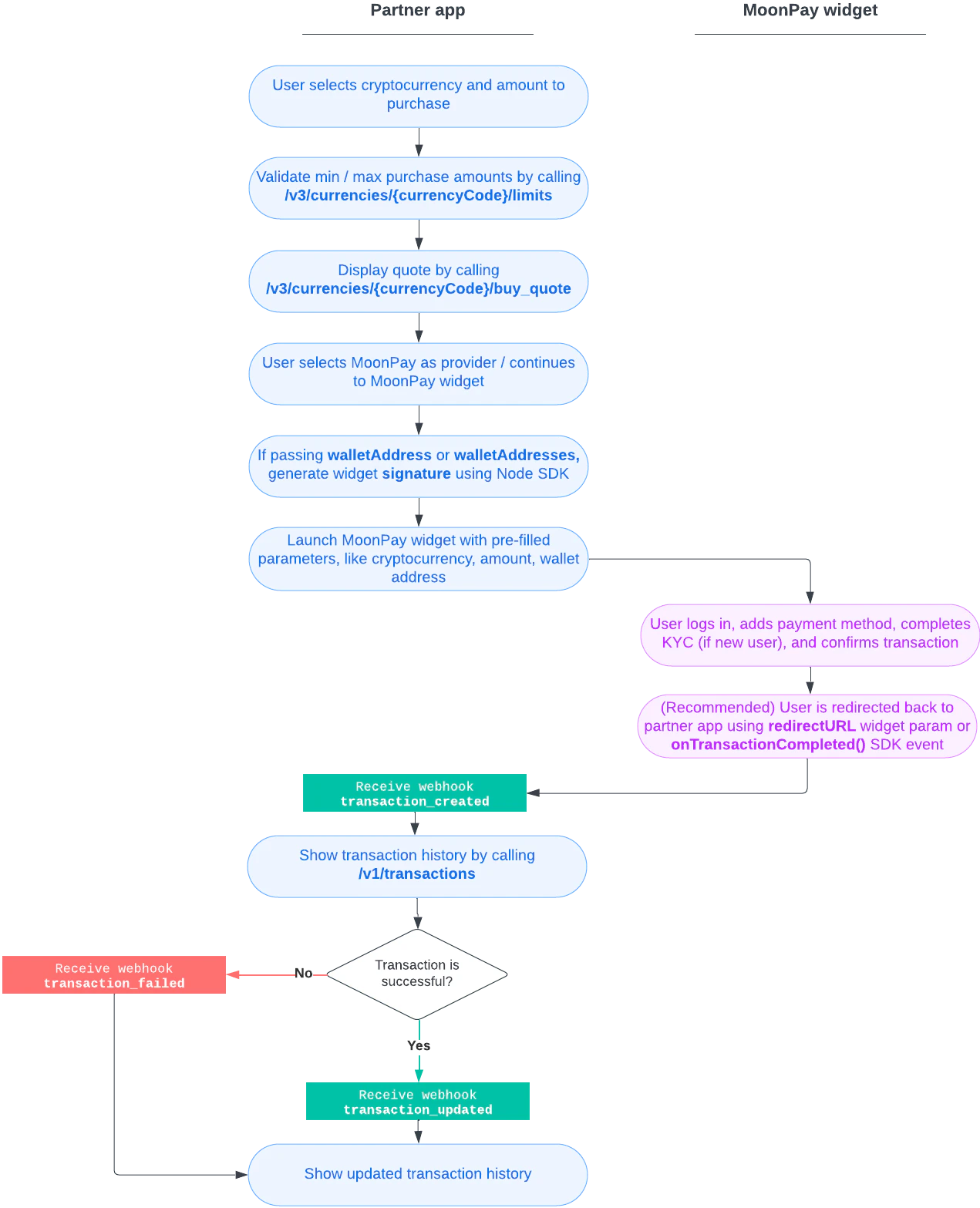
This diagram shows a basic crypto purchase flow and the components required for implementation. Use our API and webhooks to provide helpful context in your app, including minimum / maximum purchase amounts, quotes, and transaction history.