

Overview
This page defines the acceptance criteria that apply to MoonPay Platform integrations. Meeting these requirements is a condition of going live. They address usability, legal accuracy, and regulatory compliance. MoonPay may update these criteria at any time. When changes are required, MoonPay will provide reasonable written notice to allow time for implementation.How to read this page
Each requirement is annotated with a geo tag identifying where the customer must be located for the rule to apply:Applicability by payment experience
Use this matrix with the requirements below. You render means you are responsible even when you also render a MoonPay frame.Universal requirements
Accuracy
All information you present to the customer must be true, accurate, and not misleading.Terms of Use acceptance
Applies when you onboard customers through the Customer API or guest checkout: you present MoonPay’s Terms of Use and Privacy Policy in your own UI and record the customer’s acceptance, as described in Terms acceptance. This is verified before go-live, and is distinct from the per-transaction payment disclosures covered elsewhere on this page.Biometric data consent
Applies when your Customer API integration captures selfie or identity-document images: you display the biometric consent disclosure to the customer before submitting any images, as described in Biometric consent for selfie and document images. This is verified before go-live.Quote presentation
Contextual quote summary
For standalone Apple Pay, standalone Google Pay, cards, the buy button, and the widget, present the current quote on the same confirmation view before the customer submits payment. You are responsible for this presentation, including for normal buy-button and widget flows. The contextual summary must include:
Only You Pay is an exact label. You may use semantically equivalent labels
for the other three values.
Use the effective
feeBehavior
to calculate the source principal with decimal arithmetic in the quote currency:
- For
inclusive, subtract every present, non-deprecatedfees.*.amountfrom the responsesource.amount, includingfees.defi.amountwhen present. Always exclude deprecatedfees.partner.amountto avoid double counting. - For
exclusive, use the requestsource.amountas the principal.
source.amount.
Required line items
For cards, the buy button, and the widget, show these three rows when their fields are present in a table or row-based fee breakdown on the same confirmation view before the customer submits payment. Use these exact labels:
Do not add a DeFi Fee row. Do not place the contextual quote-summary values in
this fee breakdown.
Waived fees
If a fee field is absent, omit its row. If a present fee is zero or waived, show its row with$0.00, or the equivalent zero amount in the quote currency.
Amount consistency
The You Pay amount must exactly match the amount charged. Keep every quote value you present consistent with the current quote. Any discrepancy between the quoted total and the final payment will block go-live approval.Payment experience exceptions
Standalone Apple Pay and standalone Google Pay do not require you to render a fee breakdown because their payment sheets present fees. They still require the contextual quote summary above the Apple Pay or Google Pay button.Payment disclosures
Determine applicable disclosures
UsepaymentDisclosures on the
quote response
as the transaction-specific source of truth for the disclosure copy to render.
customer.country, customer.administrativeArea, and customer.area from the
check or connect complete
event identify the customer’s jurisdiction, but do not select disclosure copy
on their own.
capabilities.ramps.requirements.paymentDisclosures on the connection event is
deprecated. Use the quote response instead.
You render quote-driven disclosures for standalone Apple Pay, standalone
Google Pay, and cards. MoonPay renders them in the normal hosted buy-button and
widget UI.
Disclosures - US (New York and Washington)
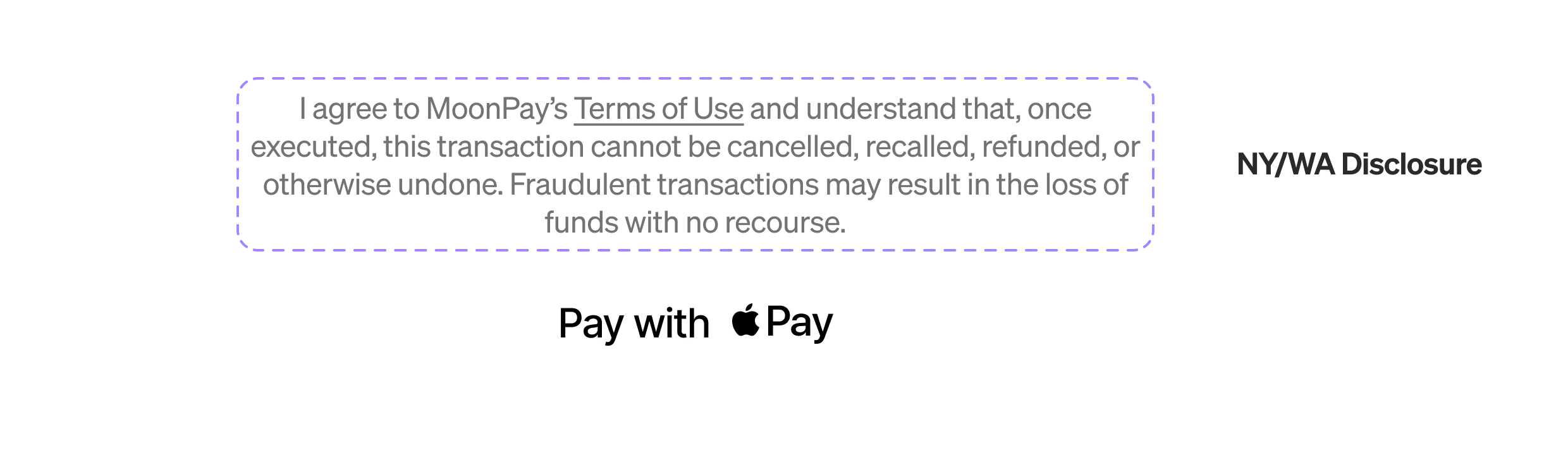
For standalone Apple Pay, whenpaymentDisclosures contains
us-transaction-finality, display the following exact text directly above the
Apple Pay frame for customers located in NY or WA:

Raw text
Raw text
I agree to MoonPay’s Terms of Use and understand that, once executed, this transaction cannot be cancelled, recalled, refunded, or otherwise undone. Fraudulent transactions may result in the loss of funds with no recourse.
HTML
HTML
Disclosures - EEA
ThepaymentDisclosures array on the quote response identifies which disclosure to render:
eea-crypto-asset-risk— render the Standard crypto-assets disclosure beloweea-unregulated-stablecoin-risk— render the Non-MiCA-compliant stablecoins disclosure below- Both present — render both
Standard crypto-assets and / or MiCA-compliant stables
Raw text
Raw text
By continuing, you agree to transact with MoonPay Europe, subject to its Terms of Use and Privacy Policy. Crypto-assets can be risky and values may decrease quickly. Transfers are irreversible once broadcast to the blockchain. The quoted exchange rate may include a spread. Learn more and review the whitepaper (if available).
HTML
HTML
Non-MiCA-compliant stablecoins
Applies when the customer is transacting in a stablecoin that is not MiCA-compliant (for example USDT, cUSD, DAI, PYUSD).Raw text
Raw text
Important: You are about to transact in a stablecoin that is not MiCA-compliant, carries fewer safeguards, and may be difficult to sell. By continuing, you agree to transact with MoonPay Europe subject to its Terms of Use and Privacy Policy. Transfers are irreversible once broadcast to the blockchain. The quoted exchange rate may include a spread. Learn more and review the whitepaper (if available).
HTML
HTML
Disclosure rendering rules
For disclosures you render, the disclosure must be visible without any interaction. It must not be hidden behind expandable menus, tooltips, or secondary screens. The Terms of Use must be a tappable link. Render the full text without truncation.Attribution
For cards, display “Powered by MoonPay” on the Buy screen.Native Google Pay (Android)
Applies when you embed standalone Google Pay in an Android WebView. In a WebView, Google Pay validates the embedding app’s package name and release signing certificate against MoonPay’s merchant profile, so your app must be approved under that profile before it can present the Google Pay sheet in production. You cannot register it under your own Google Pay profile. An unapproved app fails withOR_BIBED_11.
MoonPay registers your app under its profile. Complete the WebView setup, then
send MoonPay your app details as described in Android
WebView.
Gateway (DeFi tokens)
Applies when a customer buys a DeFi token via Gateway. Gateway is available to customers in the US, excluding New York and Washington, and quotes are only returned in that geography, so these requirements apply wherever a DeFi quote is available. A Gateway purchase happens in two steps: the customer buys a stablecoin from MoonPay, then that stablecoin is swapped for the destination token on a decentralised exchange (DEX). DeFi tokens are identified by acaip19
destination and are returned by the
list assets endpoint with
source set to defi. When a quote is for a DeFi token, its
paymentDisclosures array contains the gateway-token disclosure.
Apart from the overrides below, the card requirements under
Quote presentation and
Payment disclosures apply.
Fees and slippage
In addition to the standard required line items, display these before the customer transacts:
The Apple Pay fee exception still applies:
with Apple Pay you don’t display fees up front, but the total charged must
match the Apple Pay sheet.
Disclosures - DeFi tokens (Gateway)
Display the following exact text directly above or below the payment frame when the quote’spaymentDisclosures array contains the gateway-token disclosure
(currently version 1).
Raw text
Raw text
By proceeding, you agree to two steps under these terms: (1) Buying stablecoin from MoonPay and (2) Swapping stablecoin for your chosen destination asset via a decentralised exchange.
HTML
HTML