

URL
https://platform.moonpay.com/platform/v1/connect
Requirements
Permissions
The following permission policies are required:accelerometerautoplaycameraencrypted-mediagyroscope
Example
<iframe
  src="https://platform.moonpay.com/platform/v1/connect"
  allow="accelerometer; autoplay; camera; encrypted-media; gyroscope"
/>
Key exchange
Credentials returned from the frame are encrypted to protect their content since they are sent overpostMessage. You need to generate an X25519 keypair and pass the public key into the frame. The frame uses your public key to encrypt the payload, ensuring only you can read it with your private key.
Never persist the private key to disk or storage. Hold it in memory only for
the duration of the session.
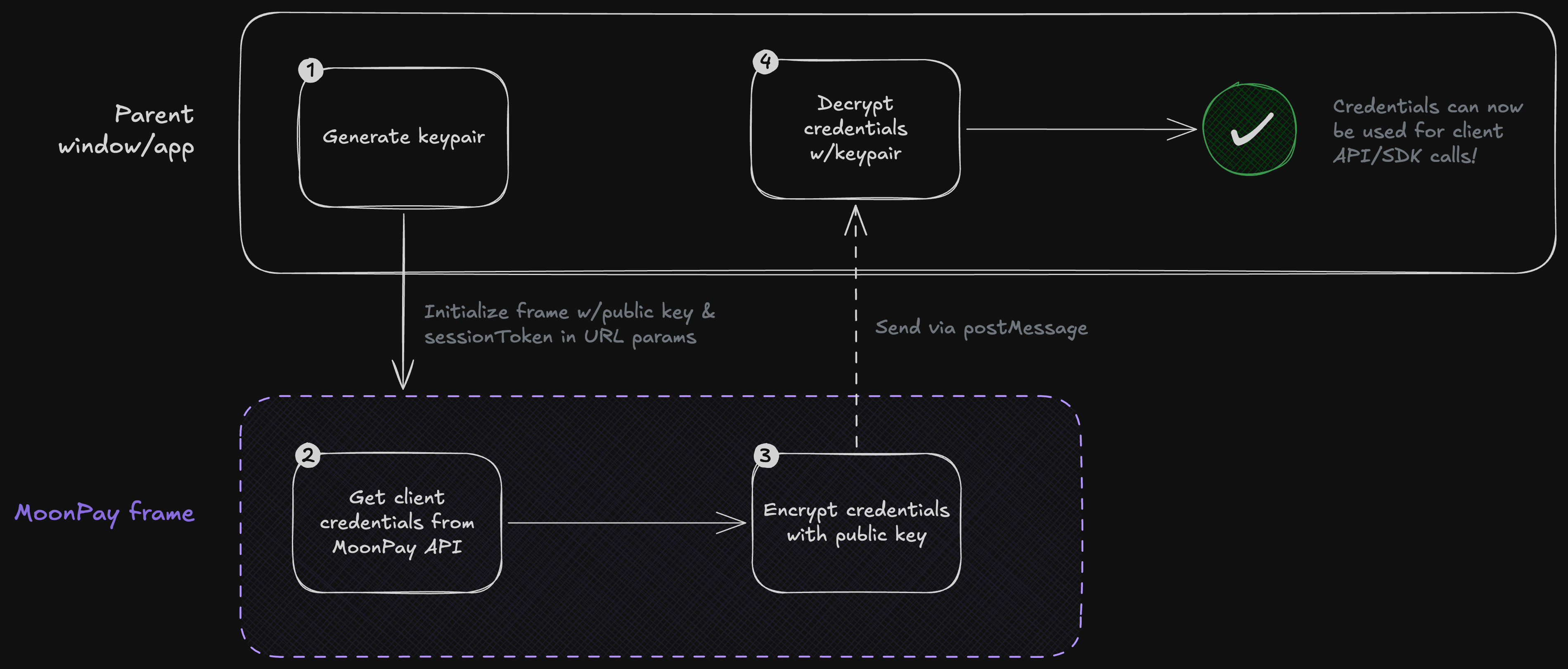
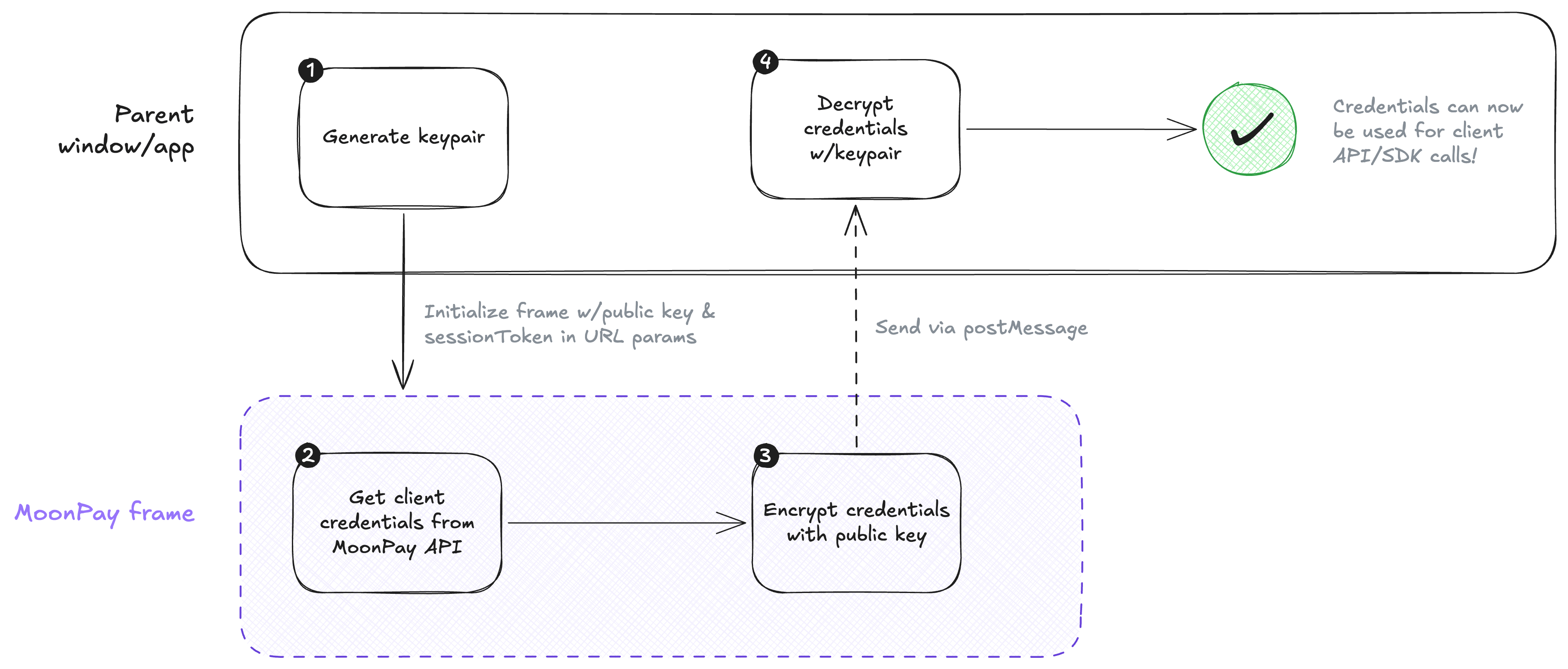
Credential verification lifecycle
Example crypto module for web
Example crypto module for web
The following example shows how to generate a keypair and decrypt credentials using
@noble/curves. You’ll want to add your own error handling and input validation for production use.pnpm i @noble/curves @noble/hashes @noble/ciphers
bun add @noble/curves @noble/hashes @noble/ciphers
npm i @noble/curves @noble/hashes @noble/ciphers
crypto.ts
// An example module for generating keypairs and decrypting client credentials.
// This should not be used as-is in production!

import { gcm } from "@noble/ciphers/aes.js";
import { x25519 } from "@noble/curves/ed25519.js";
import { hkdf } from "@noble/hashes/hkdf.js";
import { sha256 } from "@noble/hashes/sha2.js";

/** The credentials returned from the connect flow. */
export type ClientCredentials = {
  /** A JWT used to authenticate client requests to the Moonpay API. */
  accessToken: string;
  /** A JWT used to initialize authenticated frames such as Apple Pay. */
  clientToken: string;
  /** An [ISO 8601 timestamp](https://developer.mozilla.org/en-US/docs/Web/JavaScript/Reference/Global_Objects/Date/toISOString) representing the expiration time of the tokens. */
  expiresAt: string;
};

/** X25519 `privateKey` and `publicKey`as hex strings. */
export type KeyPair = Record<"privateKey" | "publicKey", string>;

export type DecryptClientCredentialsResult =
  | { ok: true; value: ClientCredentials }
  | { ok: false; error: string };

const hexToBytes = (hex: string): Uint8Array => {
  if (hex.length % 2 !== 0) {
    throw new Error("Invalid hex string");
  }

  const bytes = new Uint8Array(hex.length / 2);
  for (let i = 0; i < bytes.length; i++) {
    bytes[i] = parseInt(hex.substr(i * 2, 2), 16);
  }
  return bytes;
};

const bytesToHex = (bytes: Uint8Array): string => {
  return Array.from(bytes)
    .map((b) => b.toString(16).padStart(2, "0"))
    .join("");
};

/** Decrypts an encrypted `ClientCredentials`. */
export const decryptClientCredentials = (
  /** A base64-encoded string representing the encrypted JSON payload. **/
  encryptedCredentials: string,
  /** The recipient's X25519 private key as a hex string. **/
  privateKeyHex: string,
): DecryptClientCredentialsResult => {
  // Base64 decode the encrypted credentials
  const payload = atob(encryptedCredentials);

  // Guard and validate this deserialization
  const parsedPayload = JSON.parse(payload);
  // Convert the private key from a hex string to a `Uint8Array`
  const privateKey = hexToBytes(privateKeyHex);
  // Convert the ephemeral public key from a hex string to a `Uint8Array`
  const publicKey = hexToBytes(parsedPayload.ephemeralPublicKey);
  const ivBytes = hexToBytes(parsedPayload.iv);
  const ciphertextBytes = hexToBytes(parsedPayload.ciphertext);
  const sharedSecret = x25519.getSharedSecret(privateKey, publicKey);

  const encryptionKey = hkdf(sha256, sharedSecret, undefined, undefined, 32);
  const cipher = gcm(encryptionKey, ivBytes);
  const plainTextBytes = cipher.decrypt(ciphertextBytes);
  const plaintext = new TextDecoder().decode(plainTextBytes);

  let parsed: unknown;
  try {
    parsed = JSON.parse(plaintext);
  } catch {
    return { ok: false, error: "Failed to parse decrypted payload as JSON" };
  }

  // Validate the decrypted payload
  if (
    typeof parsed !== "object" ||
    parsed === null ||
    typeof (parsed as Record<string, unknown>).accessToken !== "string" ||
    typeof (parsed as Record<string, unknown>).clientToken !== "string" ||
    typeof (parsed as Record<string, unknown>).expiresAt !== "string"
  ) {
    return { ok: false, error: "Decrypted payload missing required fields" };
  }

  return { ok: true, value: parsed as ClientCredentials };
};

/** Generates a new X25519 key pair encryption. */
export const generateKeyPair = (): KeyPair => {
  const { secretKey: privateKey, publicKey } = x25519.keygen();

  return {
    privateKey: bytesToHex(privateKey),
    publicKey: bytesToHex(publicKey),
  };
};
Example crypto module for React Native
Example crypto module for React Native
The following example shows how to generate a keypair and decrypt credentials using
@noble/curves. You’ll want to add your own error handling and input validation for production use.In React Native, yuo will need a polyfill for getRandomValues (MDN) which is only available in browsers.pnpm i react-native-get-random-values @noble/curves @noble/hashes @noble/ciphers
bun add react-native-get-random-values @noble/curves @noble/hashes @noble/ciphers
npm i react-native-get-random-values @noble/curves @noble/hashes @noble/ciphers
crypto.ts
// An example module for generating keypairs and decrypting client credentials.
// This should not be used as-is in production!

import { gcm } from "@noble/ciphers/aes.js";
import { x25519 } from "@noble/curves/ed25519.js";
import { hkdf } from "@noble/hashes/hkdf.js";
import { sha256 } from "@noble/hashes/sha2.js";
// React Native polyfill for getRandomValues
import "react-native-get-random-values";

/** The credentials returned from the connect flow. */
export type ClientCredentials = {
  /** A JWT used to authenticate client requests to the Moonpay API. */
  accessToken: string;
  /** A JWT used to initialize authenticated frames such as Apple Pay. */
  clientToken: string;
  /** An [ISO 8601 timestamp](https://developer.mozilla.org/en-US/docs/Web/JavaScript/Reference/Global_Objects/Date/toISOString) representing the expiration time of the tokens. */
  expiresAt: string;
};

/** X25519 `privateKey` and `publicKey`as hex strings. */
export type KeyPair = Record<"privateKey" | "publicKey", string>;

export type DecryptClientCredentialsResult =
  | { ok: true; value: ClientCredentials }
  | { ok: false; error: string };

const hexToBytes = (hex: string): Uint8Array => {
  if (hex.length % 2 !== 0) {
    throw new Error("Invalid hex string");
  }

  const bytes = new Uint8Array(hex.length / 2);
  for (let i = 0; i < bytes.length; i++) {
    bytes[i] = parseInt(hex.substr(i * 2, 2), 16);
  }
  return bytes;
};

const bytesToHex = (bytes: Uint8Array): string => {
  return Array.from(bytes)
    .map((b) => b.toString(16).padStart(2, "0"))
    .join("");
};

/** Decrypts an encrypted `ClientCredentials`. */
export const decryptClientCredentials = (
  /** A base64-encoded string representing the encrypted JSON payload. **/
  encryptedCredentials: string,
  /** The recipient's X25519 private key as a hex string. **/
  privateKeyHex: string,
): DecryptClientCredentialsResult => {
  // Base64 decode the encrypted credentials
  const payload = atob(encryptedCredentials);

  // Guard and validate this deserialization
  const parsedPayload = JSON.parse(payload);
  // Convert the private key from a hex string to a `Uint8Array`
  const privateKey = hexToBytes(privateKeyHex);
  // Convert the ephemeral public key from a hex string to a `Uint8Array`
  const publicKey = hexToBytes(parsedPayload.ephemeralPublicKey);
  const ivBytes = hexToBytes(parsedPayload.iv);
  const ciphertextBytes = hexToBytes(parsedPayload.ciphertext);
  const sharedSecret = x25519.getSharedSecret(privateKey, publicKey);

  const encryptionKey = hkdf(sha256, sharedSecret, undefined, undefined, 32);
  const cipher = gcm(encryptionKey, ivBytes);
  const plainTextBytes = cipher.decrypt(ciphertextBytes);
  const plaintext = new TextDecoder().decode(plainTextBytes);

  let parsed: unknown;
  try {
    parsed = JSON.parse(plaintext);
  } catch {
    return { ok: false, error: "Failed to parse decrypted payload as JSON" };
  }

  // Validate the decrypted payload
  if (
    typeof parsed !== "object" ||
    parsed === null ||
    typeof (parsed as Record<string, unknown>).accessToken !== "string" ||
    typeof (parsed as Record<string, unknown>).clientToken !== "string" ||
    typeof (parsed as Record<string, unknown>).expiresAt !== "string"
  ) {
    return { ok: false, error: "Decrypted payload missing required fields" };
  }

  return { ok: true, value: parsed as ClientCredentials };
};

/** Generates a new X25519 key pair encryption. */
export const generateKeyPair = (): KeyPair => {
  const { secretKey: privateKey, publicKey } = x25519.keygen();

  return {
    privateKey: bytesToHex(privateKey),
    publicKey: bytesToHex(publicKey),
  };
};
Initialization parameters
| Property | Type | Required | Description |
|---|---|---|---|
clientToken | string | ✅ | The anonymous client token obtained after decrypting the credentials returned by the check frame when the status is connectionRequired. |
publicKey | string | ✅ | An ephemeral public key generated on the client. See requirements for details. The frame uses this key to encrypt the client credentials returned from the connect flow. |
channelId | string | ✅ | A unique identifier for the frame generated on your client. This value is attached to each postMessage payload to help identify messages.The format of this string is up to you. |
theme | string | Pass dark or light to force a specific appearance. If you omit this, the frame uses the user’s system appearance. |
Events
All events are dispatched using the message pattern described in the frames protocol. Below are the event payloads specific to the connect frame.Outbound events
frame->parent These events are sent from this frame to the parent window.handshake
The frame requests that you open a message channel.
{
  "version": 2,
  "meta": {
    "channelId": "ch_1"
  },
  "kind": "handshake"
}
type Message<T> = T & {
  version: 2;
  meta: { channelId: string };
};

type HandshakeEvent = Message<{
  kind: "handshake";
}>;
ready
The frame finished loading and the UI is fully rendered. You can use this to coordinate UI transitions, but you don’t need it to complete the flow.
{
  "version": 2,
  "meta": { "channelId": "ch_1" },
  "kind": "ready"
}
type Message<T> = T & {
  version: 2;
  meta: { channelId: string };
};

type ReadyEvent = Message<{
  kind: "ready";
}>;
complete
The connect flow finished. If it succeeds, the payload includes encrypted client credentials.
// Active
{
  "version": 2,
  "meta": { "channelId": "ch_1" },
  "kind": "complete",
  "payload": {
    "status": "active",
    "customer": {
      "id": "Y3VzX2FiYzEyMw==",
      "country": "USA",
      "administrativeArea": "NY"
    },
    "credentials": "<encrypted_value>"
  }
}

// Pending
{
  "version": 2,
  "meta": { "channelId": "ch_1" },
  "kind": "complete",
  "payload": {
    "status": "pending",
    "customer": {
      "id": "Y3VzX2FiYzEyMw==",
      "country": "USA",
      "administrativeArea": "NY"
    },
    "credentials": "<encrypted_value>"
  }
}

// Unavailable
{
  "version": 2,
  "meta": { "channelId": "ch_1" },
  "kind": "complete",
  "payload": {
    "status": "unavailable"
  }
}

// Failed
{
  "version": 2,
  "meta": { "channelId": "ch_1" },
  "kind": "complete",
  "payload": {
    "status": "failed",
    "reason": "Unable to create MoonPay account."
  }
}
type Message<T> = T & {
  version: 2;
  meta: { channelId: string };
};

enum ConnectionStatus {
  /** The connection is valid and can be used. **/
  active = "active",
  /** The customer is authenticated but a KYC decision is still outstanding. Credentials are attached, so you can request quotes and poll the customer's KYC status until it resolves. **/
  pending = "pending",
  /** The connection cannot be used at the current time. This typically occurs when a KYC-verified customer is using a device or application from a restricted location. **/
  unavailable = "unavailable",
  /** The connection was not created or is invalid and should not be retried. This usually happens if a customer fails KYC or cannot be onboarded to MoonPay. It can also happen if a customer rejects a connection to your application. In these cases, direct the customer to an alternate flow within your app. **/
  failed = "failed",
}

type RampsCapability = {
  requirements: Record<string, never>;
};

type CustomerCapabilities = {
  /** Capabilities for the ramps (buy and sell) product. **/
  ramps?: RampsCapability;
  /** Capabilities for the guest checkout flow. Present when guest checkout is enabled for the partner and the session is a guest-checkout session. **/
  guestCheckout?: RampsCapability;
};

type ActiveConnection = {
  status: ConnectionStatus.active;
  /** The MoonPay customer associated with this connection. **/
  customer: {
    /** The MoonPay customer identifier. **/
    id: string;
    /**
     * The customer's ISO 3166-1 alpha-3 residential country code.
     *
     * Example: `"USA"` or `"FRA"`
     */
    country?: string;
    /**
     * The state or province code for the customer's residence, included when
     * disclosures apply at the subdivision level.
     *
     * Example: `"NY"` or `"WA"`
     */
    administrativeArea?: string;
    /**
     * The broader regulatory area for the customer's country, when applicable.
     * Currently `"EEA"`.
     */
    area?: string;
  };
  /** Encrypted client credentials containing the accessToken and clientToken. Once decrypted, the value contains a stringified JSON object with the following structure:
   *
   * {
   *   "accessToken": "<token>",
   *   "clientToken": "<token>",
   *   "expiresAt": "<iso8601>",
   * }
   *
   * - `accessToken`: A token that can be used to make API requests from the client.
   * - `clientToken`: A token that can be used to initialize sensitive frames such as Apple Pay.
   * - `expiresAt`: An ISO 8601 formatted string indicating when the tokens expire.
   **/
  credentials: string;
  /** Regulatory capabilities for the connected customer. Present only when there is a requirement to surface. **/
  capabilities?: CustomerCapabilities;
};

/** Same payload as `ActiveConnection`, sent while a KYC decision is outstanding. **/
type PendingConnection = {
  status: ConnectionStatus.pending;
  /** The MoonPay customer. Use `customer.id` to poll `GET /platform/v1/customers/{id}` until KYC resolves. **/
  customer: ActiveConnection["customer"];
  /** Encrypted client credentials, in the same format as `ActiveConnection.credentials`. **/
  credentials: string;
  /** Regulatory capabilities for the customer. Present only when there is a requirement to surface. **/
  capabilities?: CustomerCapabilities;
};

type UnavailableConnection = {
  status: ConnectionStatus.unavailable;
};

type FailedConnection = {
  status: ConnectionStatus.failed;
  /** A developer-friendly description for the failure. **/
  reason: string;
};

type ConnectionCompleteEvent = Message<{
  kind: "complete";
  payload:
    | ActiveConnection
    | PendingConnection
    | UnavailableConnection
    | FailedConnection;
}>;
credentials value is an encrypted string. Once decrypted, it contains a
JSON object with accessToken, clientToken, and expiresAt. See API and SDK
credentials for
how to use each field.
error
This event dispatches errors that occur in the flow and, if available, provides steps for recovery.
// Validation error — one or more initialization parameters are missing or invalid
{
  "version": 2,
  "meta": { "channelId": "ch_1" },
  "kind": "error",
  "payload": {
    "code": "validationError",
    "errors": [
      {
        "code": "invalidClientToken",
        "message": "clientToken is required"
      }
    ]
  }
}

// Generic error — the connection could not be activated
{
  "version": 2,
  "meta": { "channelId": "ch_1" },
  "kind": "error",
  "payload": {
    "code": "generic",
    "message": "Unable to activate connection"
  }
}
type Message<T> = T & {
  version: 2;
  meta: { channelId: string };
};

type ValidationErrorSubCode =
  | "invalidClientToken"
  | "invalidSessionToken"
  | "invalidChannelId"
  | "invalidPublicKey";

type ConnectFlowError = Message<{
  kind: "error";
  payload:
    | {
        code: "validationError";
        /** One entry per invalid initialization parameter. **/
        errors: {
          code: ValidationErrorSubCode;
          /** A developer-facing error message. This message is not intended to be rendered in UI. */
          message: string;
        }[];
      }
    | {
        code: "generic";
        /** A developer-facing error message. This message is not intended to be rendered in UI. */
        message: string;
      };
}>;
Inbound events
parent->frame These events are sent from the parent window to this frame.ack
Acknowledge the handshake.
{
  "version": 2,
  "meta": { "channelId": "ch_1" },
  "kind": "ack"
}
type Message<T> = T & {
  version: 2;
  meta: { channelId: string };
};

type AckEvent = Message<{
  kind: "ack";
}>;